Mobile facility management for TTD staff and supervisors
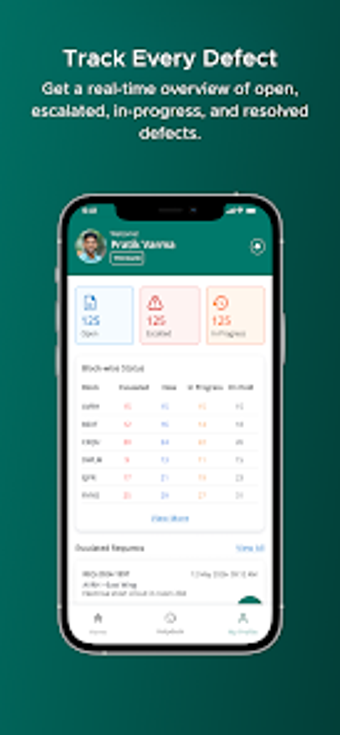
Nandakam, developed by 3Five8 Technologies, is an Android facility-management app for Tirumala Tirupati Devasthanams administrators. It digitizes defect reporting, photo documentation, task assignment and status tracking so supervisors and field staff can submit and monitor maintenance incidents with location and timestamps. Key elements include photo uploads, real-time lifecycle tracking and centralized digital records replacing paper logs. Designed for authorized personnel, the app helps coordinate field teams and engineering supervisors at large religious facilities.

Unlock your creativity with Adobe Stock
Get 10 images or 1 video with a free trial
What operational role does the app play at TTD?
Nandakam centralizes maintenance administration for the Nandakam Rest House complex and other TTD facilities, replacing paper-based records with a digital workflow that supports managerial oversight. Centralized records create an audit trail for administrative review and accountability. Supervisors can view historical logs across facilities, helping with planning and compliance, while field staff record incidents that enter the same institutional record system.
How private are maintenance records?
Access to the app is account-gated: a valid TTD employee or authorized personnel login is required, which confines records to organizational users. The platform maintains a historical log of maintenance activities for administrative review, providing traceability of assignments and closures. These access controls position the tool as an internal administrative system rather than a public reporting channel.
Is the app practical for field staff on the move?
The app is optimized for quick on-site reporting, enabling staff to capture photographs and location data while moving through facilities. Its Android deployment suits common mobile devices used by field teams, and digital task submission reduces paper handling. Onboarding and account provisioning are organization-controlled, so supervisors manage who can report and receive work assignments, aligning access with staff roles and operational shifts.
How does the app coordinate assignments and progress tracking?
Supervisors can digitally assign reported defects to specific maintenance personnel or engineers and monitor status updates through the reported lifecycle. Real-time tracking of tasks gives managers visibility into progress and closure rates, while centralized logs support later administrative review. The developer's experience with large-scale community and facility platforms informs this operational focus, positioning the tool for institutional maintenance workflows rather than public interaction.
Nandakam is a practical internal option for TTD maintenance teams
Nandakam is a pragmatic option for authorized TTD personnel who need institutional accountability and field-to-supervisor coordination. Because access is limited to organization-issued accounts and the app targets Android devices, adoption is governed by TTD operational policies. Teams responsible for onsite maintenance coordination benefit most; non-staff audiences and pilgrims should not expect access or public-facing functionality. That focus makes it suitable for structured administrative environments within the temple trust.